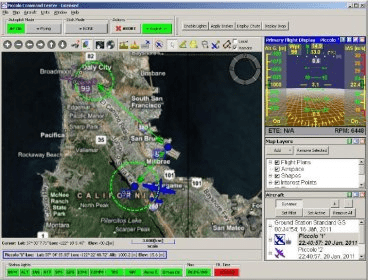
Piccolo Command Center (PCC) is a software program that runs on a Windows PC and provides an interface for controlling Piccolo operations. This interface can be used to access all of the system's features. In the image shown, three windows are docked to the right side of the display. To undock a window, simply click and drag the title bar using the mouse. To dock a window, drag it to the right or left side of the screen and wait for the dock to open.
Piccolo Command Center (PCC) is a software application that runs on a Windows PC and provides a command and control interface for Piccolo operators. Most of the system features are accessible from this interface.
All of the windows in the PCC (except the map window) can be turned on or off, and can be
docked or left floating. In the screen shown above, there are three windows docked to the right
side of the display. To undock a window simply click and drag the title bar with the mouse. To
dock a window, drag it to the right or left side of the screen and wait for the dock to open. You
can also double-click on the title bar of a floating window to cause it to dock.
In addition to windows there are several toolbars in the PCC. These can also be moved and, in
some cases, turned off. To move a toolbar, click on the left side of the bar and drag it with the
mouse. Toolbars cannot be left floating, they will always dock to either the top or bottom of the PCC.




Comments (1)
typically used to mark boundaries in an available air space.